
Viber vs Daybreak 1:0
What happens to old Viber messages when I sync them to my computer for the first time?
When I first launch Viber on a new computer, conversations I previously had on my phone appear after a few confirmations. For years, I had wondered what happens to those old messages in the brief period it takes to move them between devices. When I gained access to OpenAI Daybreak as a cybersecurity specialist, I decided to use it to look into that question. I had a suspicion and wanted to see whether it held up.
The first sync
The process is easy to picture. I install Viber on Windows, scan the QR code on the computer with my phone, and approve the sync on the phone. Shortly afterward, earlier conversations appear in the new app. That is all I see as a user. From a privacy perspective, though, what happens during that brief transfer determines who can read years of accumulated messages while they are in transit.
Viber uses end-to-end encryption for private chats. For a new message, the idea is straightforward. One device encrypts the message, the other decrypts it, and the service relays it. During the first desktop sync, the computer receives messages written before it was even linked to my account. I wanted to know whether the app protects this one-time transfer on the same principle.
My suspicion was that the older messages might pass through Viber’s systems in a form the service could decrypt. An encrypted network connection by itself allows for that possibility because the server at the other end can read the data sent to it. With end-to-end encryption, the messages themselves stay encrypted in transit, and decrypting them requires keys held by the devices. That was the distinction I wanted to investigate.
What can you see on the network?
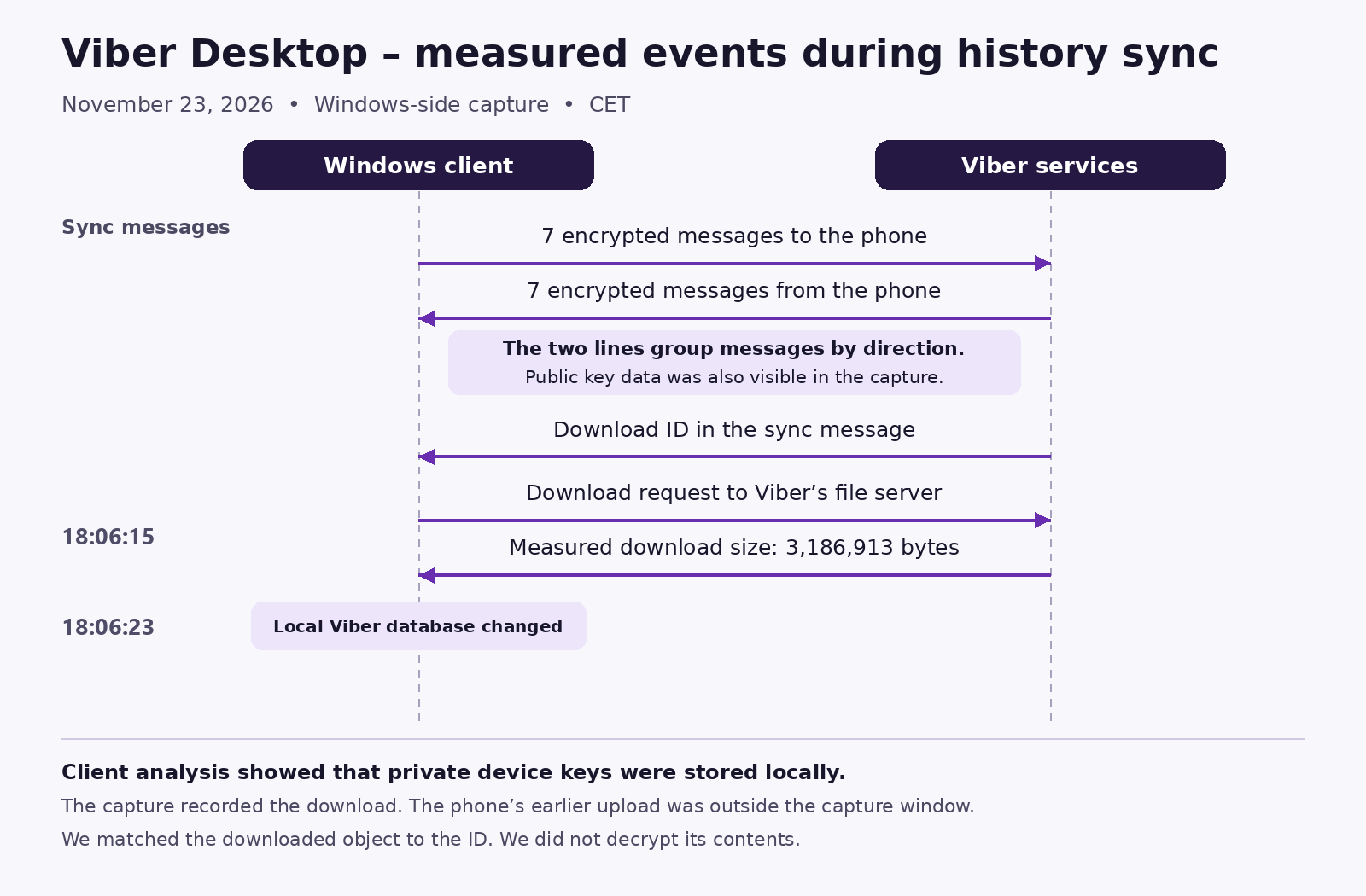
I ran the phone-to-Windows sync several times on my own devices. On my local network, I placed a proxy between the computer and Viber’s servers. That let me record the traffic between the desktop app and the service as old conversations moved over from the phone. With Daybreak’s help, I analyzed the traffic alongside the behavior of the desktop client.
The test had a simple objective. Recovering even one old message from the recorded data would give me something concrete to investigate. In the first measurements, the message text remained unreadable. That alone told me little about Viber’s protection. A capture can also look unreadable when you have yet to understand how the app packages and sends its data. So I kept looking at what happened once we could make sense of the connection itself.
What protects the messages?
Once we could follow the recorded connection, the analysis revealed a separate layer of end-to-end encryption for the chat history. The message text remained unreadable. Further analysis showed that the key material needed to decrypt it is generated on the devices and could not be derived from the recorded traffic. Meanwhile, the computer displayed the conversations as expected.
That was the most important result for me. The very same sync that let me read my past conversations on my own computer yielded no readable message text in the network capture. The client analysis explained what we saw in the capture. The protection depended on keys held by the participating devices and remained in place during transfer.
What does this say about Viber’s security?
The test covered the first transfer of conversations from a phone to a newly linked Windows client. Viber demonstrated a high level of protection in that specific scenario. I had suspected that adding a new device might be an exception to end-to-end protection. In the sync we examined, the content of earlier messages was protected by end-to-end encryption throughout the transfer.
I appreciate that as a user. When setting up a new computer, I expect to pick up a conversation where I left off on my phone. I now have firsthand measurements showing how Viber protects what I wrote or received years earlier as it makes that possible.
Viber wins this round
I wanted to see if Daybreak could help confirm a long-standing suspicion. I came away with more confidence in this part of Viber than I had going in. For a cybersecurity test, I think that is a good outcome.
The score stands at 1:0. I’ll be trying other cybersecurity AI tools soon. I still have a few old questions worth looking into.
References
OpenAI – Daybreak, OpenAI’s cybersecurity program
Rakuten Viber – Set up Viber on your desktop
Rakuten Viber – Understanding end-to-end encryption